python机器学习-数据预处理
数据预处理
处理非数值型数据
import pandas as pd

df = pd.DataFrame([
                    ['green', 'M', 10.1, 'class1'],
                    ['red', 'L', 13.5, 'class2'],
                    ['blue', 'XL', 15.3, 'class1']])
df.columns = ['color', 'size', 'price', 'classlabel']
print(df)
color size price classlabel
0 green M 10.1 class1
1 red L 13.5 class2
2 blue XL 15.3 class1利用pandas将CSV格式的数据读取进来,要将字符串转换为适合机器学习算法训练的数据类型。
先对特征size数据进行处理,由于XL>L>M,size特征有这样的一个顺序特征,所以将这类字符串转换为数值时也该保留顺序特征。利用映射函数map很容易将字符串转换:
size_mapping = {
                'XL': 3,
                'L': 2,
                'M': 1}
df['size'] = df['size'].map(size_mapping)
print(df)
color size price classlabel
0 green 1 10.1 class1
1 red 2 13.5 class2
2 blue 3 15.3 class1可以利用小技巧将数值数据转换回字符串:
inv_size_mapping = {v: k for k, v in size_mapping.items()}
print(df['size'].map(inv_size_mapping) )
0 M
1 L
2 XL
Name: size, dtype: object对于分类标签classlabe,只需要将字符串转换为数值特征就好。
利用枚举函数enumerate()和np.unique()将标签导出为映射字典,在用映射函数map将分类标签转换为整数:
import numpy as np
class_mapping = {label:idx for idx,label in
                 enumerate(np.unique(df['classlabel']))}
df['classlabel'] = df['classlabel'].map(class_mapping)
print(df)
color size price classlabel
0 green 1 10.1 0
1 red 2 13.5 1
2 blue 3 15.3 0同样将整数值可以反映射回分类标签:
inv_class_mapping = {v: k for k, v in class_mapping.items()}
df['classlabel'] = df['classlabel'].map(inv_class_mapping)
print(df)
color size price classlabel
0 green 1 10.1 class1
1 red 2 13.5 class2
2 blue 3 15.3 class1也可直接调用sklearn库LabelEncoder类实现:
from sklearn.preprocessing import LabelEncoder

class_le = LabelEncoder()
y = class_le.fit_transform(df['classlabel'].values)
print(y)
[0 1 0]class_le.inverse_transform(y)array(['class1', 'class2', 'class1'], dtype=object)接下来考虑特征color,颜色green,red,blue没有顺序特征,可以采用热编码的方式将其转换,调用pandas中的get_dummies方法转换字符串:
pd.get_dummies(df[['price', 'color', 'size']])| price | size | color_blue | color_green | color_red | |
|---|---|---|---|---|---|
| 0 | 10.1 | 1 | 0 | 1 | 0 |
| 1 | 13.5 | 2 | 0 | 0 | 1 |
| 2 | 15.3 | 3 | 1 | 0 | 0 |
划分数据集为训练集和测试集
import pandas as pd
import numpy as np

df_wine = pd.read_csv('https://archive.ics.uci.edu/'
                       'ml/machine-learning-databases/'
                       'wine/wine.data', header=None)
df_wine.columns = ['Class label', 'Alcohol',
                       'Malic acid', 'Ash',
                       'Alcalinity of ash', 'Magnesium',
                       'Total phenols', 'Flavanoids',
                       'Nonflavanoid phenols',
                       'Proanthocyanins',
                       'Color intensity', 'Hue',
                       'OD280/OD315 of diluted wines',
                       'Proline']
print('Class labels', np.unique(df_wine['Class label']))
df_wine.head()
Class labels [1 2 3]| Class label | Alcohol | Malic acid | Ash | Alcalinity of ash | Magnesium | Total phenols | Flavanoids | Nonflavanoid phenols | Proanthocyanins | Color intensity | Hue | OD280/OD315 of diluted wines | Proline | |
|---|---|---|---|---|---|---|---|---|---|---|---|---|---|---|
| 0 | 1 | 14.23 | 1.71 | 2.43 | 15.6 | 127 | 2.80 | 3.06 | 0.28 | 2.29 | 5.64 | 1.04 | 3.92 | 1065 |
| 1 | 1 | 13.20 | 1.78 | 2.14 | 11.2 | 100 | 2.65 | 2.76 | 0.26 | 1.28 | 4.38 | 1.05 | 3.40 | 1050 |
| 2 | 1 | 13.16 | 2.36 | 2.67 | 18.6 | 101 | 2.80 | 3.24 | 0.30 | 2.81 | 5.68 | 1.03 | 3.17 | 1185 |
| 3 | 1 | 14.37 | 1.95 | 2.50 | 16.8 | 113 | 3.85 | 3.49 | 0.24 | 2.18 | 7.80 | 0.86 | 3.45 | 1480 |
| 4 | 1 | 13.24 | 2.59 | 2.87 | 21.0 | 118 | 2.80 | 2.69 | 0.39 | 1.82 | 4.32 | 1.04 | 2.93 | 735 |
首先将数据读取,调用train_test_split函数将数据集划分,参数test_size=0.3表示将数据集的30%
划分给测试集,把70%划分给训练集,stratify=y表示训练集中各个类别的比例和测试集中一样。
from sklearn.model_selection import train_test_split

X, y = df_wine.iloc[:, 1:].values, df_wine.iloc[:, 0].values
X_train, X_test, y_train, y_test =train_test_split(X, y,
                                             test_size=0.3,
                                             random_state=0,
                                             stratify=y)
数据正则化
数据正则化对线性模型和梯度下降等优化算法特别有用。但基于树的模型不需要进行标准化。
创建StandardScaler对象,调用fit方法获取样本均值和标准差,再用这些参数去转换测试集。
from sklearn.preprocessing import StandardScaler

sc = StandardScaler()
sc.fit(X_train)
X_train_std = sc.transform(X_train)
X_test_std = sc.transform(X_test)
特征的选择
L1正则化:
import matplotlib.pyplot as plt
from sklearn.linear_model import LogisticRegression

fig = plt.figure()
ax = plt.subplot(111)
colors = ['blue', 'green', 'red', 'cyan',
          'magenta', 'yellow', 'black',
          'pink', 'lightgreen', 'lightblue',
          'gray', 'indigo', 'orange']
weights, params = [], []
for c in np.arange(-4., 6.):
    lr = LogisticRegression(penalty='l1',
                            C=10.**c,
                            random_state=0,solver='liblinear',multi_class='ovr')
    lr.fit(X_train_std, y_train)
    weights.append(lr.coef_[1])
    params.append(10**c)
weights = np.array(weights)
for column, color in zip(range(weights.shape[1]), colors):
    plt.plot(params, weights[:, column],
             label=df_wine.columns[column + 1],
             color=color)
plt.axhline(0, color='black', linestyle='--', linewidth=3)
plt.xlim([10**(-5), 10**5])
plt.ylabel('weight coefficient')
plt.xlabel('C')
plt.xscale('log')
plt.legend(loc='upper left')
ax.legend(loc='upper center',
          bbox_to_anchor=(1.38, 1.03),
          ncol=1, fancybox=True)
plt.show() 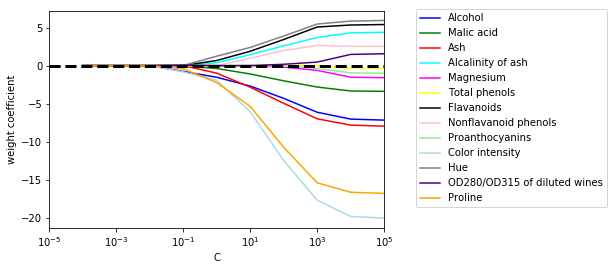
纵轴对应各个特征的权重,横轴参数C是正则化参数的逆,参数C越小,模型的正则化强度就越强,上述采用L1正则化,可以看到,当C极小的时候,各个特征的权值都趋近于0,然而,当C越大时,有些特征的权重依然徘徊在0附近,这说明对于该分类模型来说,这些特征对于分类的作用没有那么明显,所以,我们可以在训练模型的时候将这些模型去掉,以简化分类模型,减少泛化误差。可以说,L1正则化是一种特征选择技术。
转载请注明来源,欢迎对文章中的引用来源进行考证,欢迎指出任何有错误或不够清晰的表达。可以在下面评论区评论,也可以邮件至 572108581@qq.com
文章标题:python机器学习-数据预处理
文章字数:1.5k
本文作者:ZSH
发布时间:2019-10-10, 20:12:47
最后更新:2019-12-19, 19:48:37
原始链接:https://zhongshanhao.github.io/2019/10/10/data-preprocessing/版权声明: "署名-非商用-相同方式共享 4.0" 转载请保留原文链接及作者。